Border Arrays
A BorderArray is a light wrapper on a parent::AbstractArray that expands the domain by a border with the prescribed extent given in the constructor by edges. The border is added by a rule that prescribes a value to a given index that is not contained in the domain of the parent.
TransferFunctions.BorderArray — TypeBorderArray{T,N,AA,AB} <: AbstractArray{T,N}A border array with a border of type AB with the parent array of type AA.
It is a light wrapper around the parent array that defines Base.getindex to return values with its supplied border scheme.
julia> TransferFunctions.BorderArray(reshape(1:36, (6,6)), TransferFunctions.Fill, 2)
10×10 border_array(reshape(::UnitRange{Int64}, 6, 6), fill(0)) with eltype Int64 with indices -1:8×-1:8:
 0  0  0   0   0   0   0   0  0  0
 0  0  0   0   0   0   0   0  0  0
 0  0  1   7  13  19  25  31  0  0
 0  0  2   8  14  20  26  32  0  0
 0  0  3   9  15  21  27  33  0  0
 0  0  4  10  16  22  28  34  0  0
 0  0  5  11  17  23  29  35  0  0
 0  0  6  12  18  24  30  36  0  0
 0  0  0   0   0   0   0   0  0  0
0 0 0 0 0 0 0 0 0 0TransferFunctions.border_array — Functionborder_array(A, border, padding)Construct a BorderArray of A with the border border and padding padding.
See also padtoaxes
julia> border_array(reshape(1:9, (3,3)), :circular, 2)
7×7 border_array(reshape(::UnitRange{Int64}, 3, 3), :Circular) with eltype Int64 with indices -1:5×-1:5:
 5  8  2  5  8  2  5
 6  9  3  6  9  3  6
 4  7  1  4  7  1  4
 5  8  2  5  8  2  5
 6  9  3  6  9  3  6
 4  7  1  4  7  1  4
5 8 2 5 8 2 5A BorderArray is useful for expanding the domain of an array during filtering (i.e. convolution or correlation) to avoid boundary effects while preserving the original size of the array in the output.
While this is a common practice for making calculations in the Fourier domain and then returning to the natural domain of the array, when you want to make some parameter estimation or want to determine a value directly from the Fourier images of arrays, using TaperedArrays or a combination of a BorderArray and a TaperedArray can be more appropriate.
Border Types
The procedure of determining the value of the border of the BorderArray is determined by the border field which has a subtype of AbstractBorder.
TransferFunctions.AbstractBorder — TypeAbstractBorder{T}Super type for borders of arrays with the element type T
Implementation
A new border type needs to implement
Base.getindex(b::AbstractBorder{T}, A::AbstractArray{T,N}, I::Vararg{Int,N}) where {T,N}where A is the parent array of the BorderArray.
For different applications, different border types are optimal.
TransferFunctions.Replicate — TypeReplicate{T} <: IndexMapBorder{T}A border that replicates the closest edge value of the parent array
julia> TransferFunctions.BorderArray(reshape(1:16, (4,4)), TransferFunctions.Replicate, 2)
8×8 border_array(reshape(::UnitRange{Int64}, 4, 4), :Replicate) with eltype Int64 with indices -1:6×-1:6:
 1  1  1  5   9  13  13  13
 1  1  1  5   9  13  13  13
 1  1  1  5   9  13  13  13
 2  2  2  6  10  14  14  14
 3  3  3  7  11  15  15  15
 4  4  4  8  12  16  16  16
 4  4  4  8  12  16  16  16
4 4 4 8 12 16 16 16TransferFunctions.Symmetric — TypeSymmetric{T} <: IndexMapBorder{T}A border that symmetrically continues the values or the parent array around the edges, i.e. mirrors around the last valid parent index.
julia> TransferFunctions.BorderArray(reshape(1:16, (4,4)), TransferFunctions.Symmetric, 2)
8×8 border_array(reshape(::UnitRange{Int64}, 4, 4), :Symmetric) with eltype Int64 with indices -1:6×-1:6:
 11  7  3  7  11  15  11  7
 10  6  2  6  10  14  10  6
  9  5  1  5   9  13   9  5
 10  6  2  6  10  14  10  6
 11  7  3  7  11  15  11  7
 12  8  4  8  12  16  12  8
 11  7  3  7  11  15  11  7
10 6 2 6 10 14 10 6TransferFunctions.Reflect — TypeReflect{T} <: IndexMapBorder{T}A border that reflects the values of the border around the edges of the parent array
julia> TransferFunctions.BorderArray(reshape(1:16, (4,4)), TransferFunctions.Reflect, 2)
8×8 border_array(reshape(::UnitRange{Int64}, 4, 4), :Reflect) with eltype Int64 with indices -1:6×-1:6:
 6  2  2  6  10  14  14  10
 5  1  1  5   9  13  13   9
 5  1  1  5   9  13  13   9
 6  2  2  6  10  14  14  10
 7  3  3  7  11  15  15  11
 8  4  4  8  12  16  16  12
 8  4  4  8  12  16  16  12
7 3 3 7 11 15 15 11TransferFunctions.Circular — TypeCircular{T} <: IndexMapBorder{T}A border that wraps the values around the edges of the parent array
julia> TransferFunctions.BorderArray(reshape(1:16, (4,4)), TransferFunctions.Circular, 2)
8×8 border_array(reshape(::UnitRange{Int64}, 4, 4), :Circular) with eltype Int64 with indices -1:6×-1:6:
 11  15  3  7  11  15  3  7
 12  16  4  8  12  16  4  8
  9  13  1  5   9  13  1  5
 10  14  2  6  10  14  2  6
 11  15  3  7  11  15  3  7
 12  16  4  8  12  16  4  8
  9  13  1  5   9  13  1  5
10 14 2 6 10 14 2 6TransferFunctions.Fill — TypeFill{T} <: AbstractBorder{T}A border that fills the values with value::T
If you want to simply remove the boundary effects of filtering and do not care about the values of the edges of the output (or the filtering kernel is small enough compared to the array that the edges are not important) you can fill the border with zeros or some other value
# For a filtering kernel with axes (-30:30, -30:30)
A_zero_padded = border_array(A, :fill, 30) # single padding for all the dimensions and left/right edges
A_mean_padded = border_array(A, TransferFunctions.Fill(mean(A)), (30, 30)) # (left, right) padding
A_unequally_padded = border_array(A, TransferFunctions.Fill(mean(A)), ((25, 20), (40, 35))) # In the order of axes i.e. ((top, bottom), (left, right))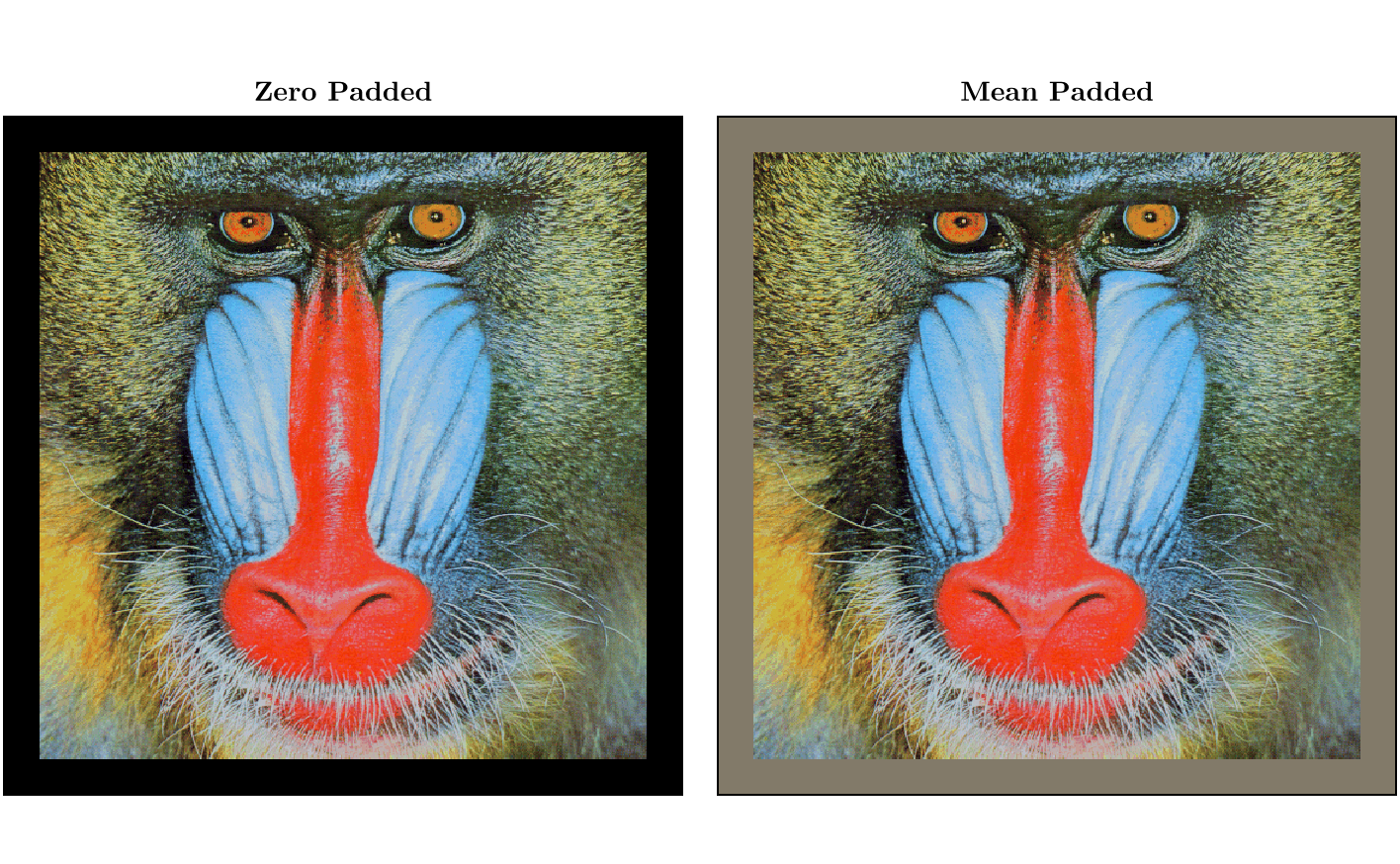
If the border values are important to you, it is better to use some border scheme that relates to the values of the parent array in the locality of the border or the opposing edge of the array. The types of borders that are implemented are :replicate, :reflect, :circular and :symmetric.
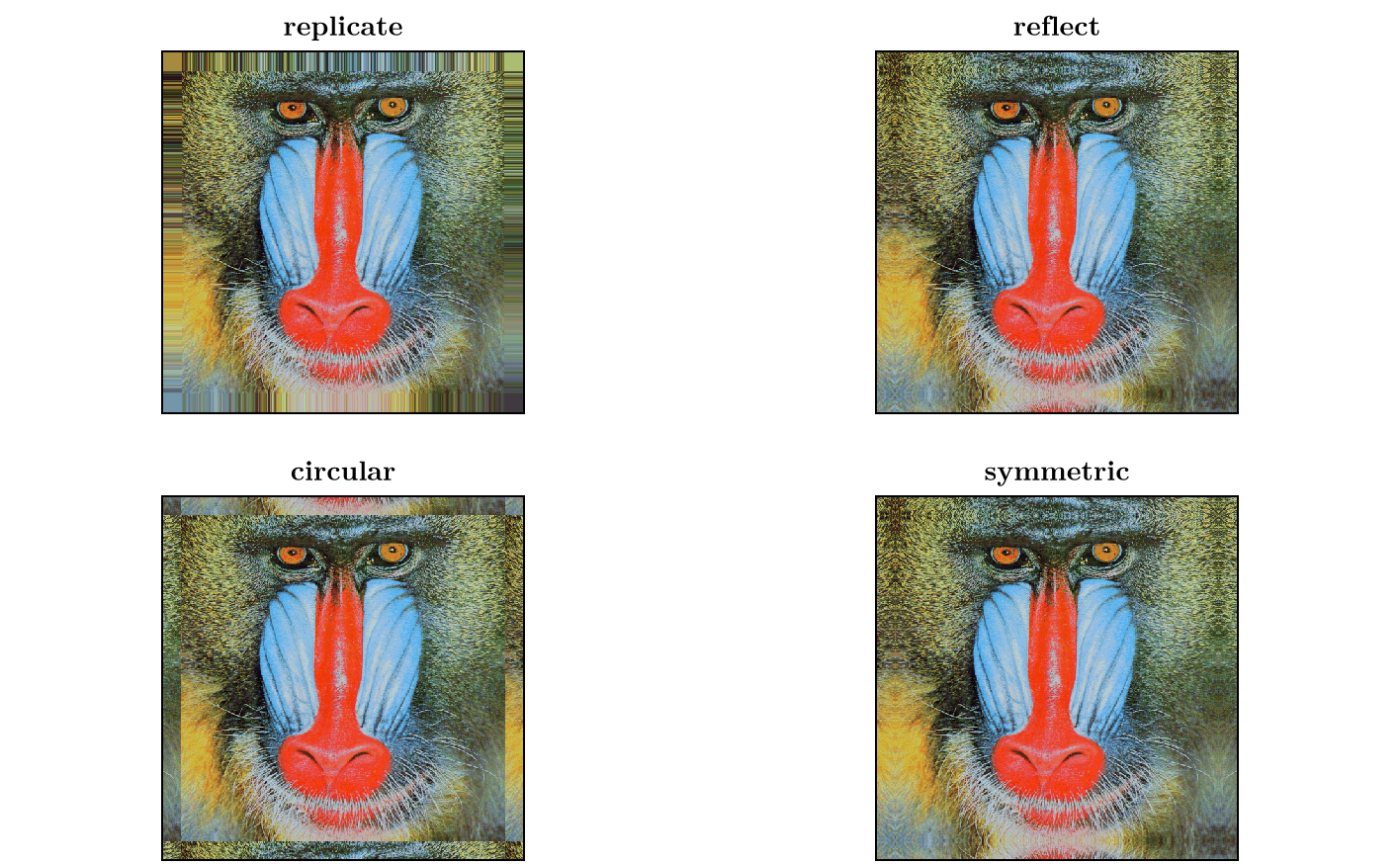
If the border type does not support the extent of the padding that is given in the constructor, the TransferFunctions.InvalidBorderExtent is thrown.
TransferFunctions.InvalidBorderExtent — TypeInvalidBorderExtent <: ExceptionIs thrown when trying to construct a BorderArray with padding larger than the maximum padding that would produce valid values.
Functions
Border arrays are useful for extending the domain of an array for filtering.
This motivates some helper functions for sampling an extended array at given indices.
To determine the padding necessary for a given kernel in filtering, you can use kern_padding
TransferFunctions.kern_padding — Functionkern_padding(kern)Determine the padding necessary to keep the input array fully contained in the interior of the output when filtered with kern.
julia> K = OAs.OffsetArray(ones(11,8) ./ (11*8), -5:5, -3:4);

julia> TF.kern_padding(K)
((5, 5), (3, 4))For determining the indices that are necessary in the parent to facilitate a filtering, you can use outer_axes
TransferFunctions.outer_axes — Functionouter_axes(A, edges)
outer_axes(A, K)Determine the outer axes of A with an edge extension of edges or when the axes of a filtering with kernel K should have the output A / an extent of the axes of A.
For instance this is useful when one wants to select the indices necessary to take from some array in order to determine the filtered array with some kernel K at indices of A without the need for calculating for all of the indices of the initial array.
See also inner_axes.
julia> TF.outer_axes(ones(100,100), ((2,4), (1,10)))
(-1:104, 0:110)

julia> TF.outer_axes(ones(100,100), OAs.OffsetArray(ones(11,11), -5:5, -3:7))
(-4:105, -2:107)For extending the domain of an array to some given indices with a border strategy, you can use padtoaxes. This may also be useful if you do not want to have all the indices of the parent in the output of a filtering.
TransferFunctions.padtoaxes — Functionpadtoaxes(A, border, target)Construct a BorderArray (if necessary) with the given border type such that the axes of the output are target.
For any indices where the target is contained in the parent A, a view is taken without adding a padding.
See also border_array.
julia> padtoaxes(OAs.OffsetArray(reshape(1:100^2, 100, 100), -30:69, -20:79), :fill, (-35:-25, -30:-15))
11×16 border_array(view(OffsetArray(reshape(::UnitRange{Int64}, 100, 100), -30:69, -20:79), Base.IdentityUnitRange(-30:-25), Base.IdentityUnitRange(-20:-15)), fill(0)) with eltype Int64 with indices -35:-25×-30:-15:
 0  0  0  0  0  0  0  0  0  0  0    0    0    0    0    0
 0  0  0  0  0  0  0  0  0  0  0    0    0    0    0    0
 0  0  0  0  0  0  0  0  0  0  0    0    0    0    0    0
 0  0  0  0  0  0  0  0  0  0  0    0    0    0    0    0
 0  0  0  0  0  0  0  0  0  0  0    0    0    0    0    0
 0  0  0  0  0  0  0  0  0  0  1  101  201  301  401  501
 0  0  0  0  0  0  0  0  0  0  2  102  202  302  402  502
 0  0  0  0  0  0  0  0  0  0  3  103  203  303  403  503
 0  0  0  0  0  0  0  0  0  0  4  104  204  304  404  504
 0  0  0  0  0  0  0  0  0  0  5  105  205  305  405  505
0 0 0 0 0 0 0 0 0 0 6 106 206 306 406 506By default, this constructs a border array from the view into the parent array. If you use some border strategy that uses indices and/or values of the other edge, you may want to have the border array constructed from the full array instead and take the view into it. This can be done by setting the outerpadding keyword argument to true.
julia> padtoaxes(reshape(1:121, 11, 11), :circular, (-1:2, -1:2))
4×4 border_array(view(reshape(::UnitRange{Int64}, 11, 11), Base.IdentityUnitRange(1:2), Base.IdentityUnitRange(1:2)), :Circular) with eltype Int64 with indices -1:2×-1:2:
 1  12  1  12
 2  13  2  13
 1  12  1  12
 2  13  2  13

julia> padtoaxes(reshape(1:121, 11, 11), :circular, (-1:2, -1:2); outerpadding=true)
4×4 view(border_array(reshape(::UnitRange{Int64}, 11, 11), :Circular), Base.IdentityUnitRange(-1:2), Base.IdentityUnitRange(-1:2)) with eltype Int64 with indices -1:2×-1:2:
 109  120  10  21
 110  121  11  22
 100  111   1  12
 101  112   2  13